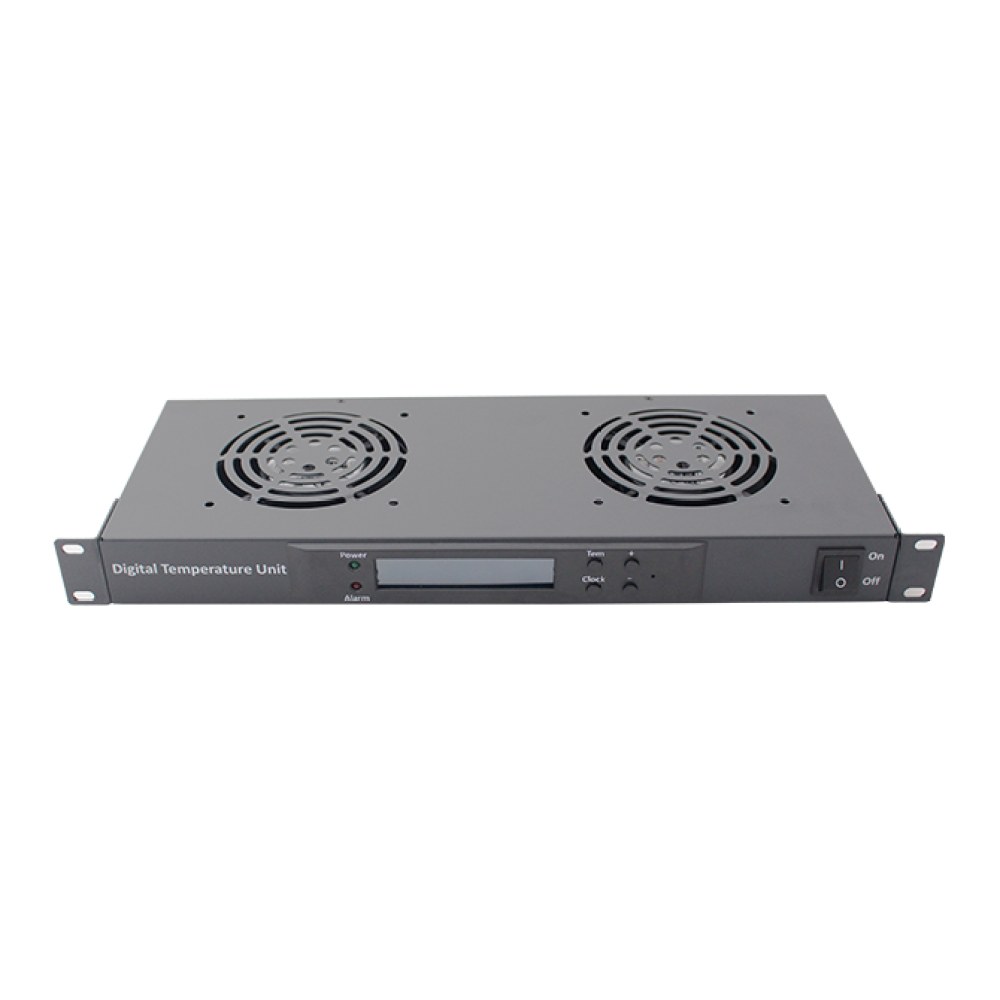
A 1U, 19" rack-mount fan unit with a digital temperature controller, for cooling the inside of a cabinet. It is reliable and easy to operate, and alarms when the temperature limit is reached or a sensor fails.
Features
- Versions with 2, 4, 6 or 8 fans
- Oil-bearing AC cooling fans; roller bearings optional
- IEC C14 power input; power cable not included as standard, added on request
- 2 mounting ears and an on/off switch
- Digital controller with operating manual
- Alarms for over-temperature, output and sensor faults
Specifications
| Operating environment | -5 °C to 50 °C |
|---|---|
| Relative humidity | 20% to 85%, non-condensing |
| Supply voltage | 220 VAC ±10% (110 VAC optional) |
| Measuring range | 0 °C to 50 °C |
| Control range | 0 °C to 50 °C |
| Accuracy | ±1 °C |
| Relay contact rating | 7 A / 250 VAC |
Front panel
- Temperature controller
- Switch
- Power input
- Sensor connection
- Power output (1)
- Power output (2)
Installation
- Connect the temperature sensor to the controller's sensor port.
- Connect mains power to the controller's power input with the supplied lead.
- Check all connections, switch on and set the controller to the required temperature.
Controller operation
- View settings: when not in setting mode, press the key to show the set temperature; press the other key to show the difference between the current and set temperature. After 2 seconds the display returns to the current temperature.
- Enter user settings: hold SET for more than 5 seconds. The setting indicator lights and the current temperature is shown.
- Adjust temperature: press up or down to change by 1 degree per press; hold for more than 2 seconds to change quickly.
- Exit user settings: hold SET for 5 seconds, or make no input for 30 seconds. The setting is saved and normal operation resumes.
- Administrator menu: when not in setting mode, hold SET and the other key together for more than 5 seconds. The setting light comes on and item F1 is shown.